Module 8.4: Decision trees, recursive functions, and `for` loops
Decision trees, recursive functions, and for loops
Your design diagrams for Module 7 should have shown a tree structure showing all the rooms of your game as blocks and branches for each of the decisions your player could make.
You can implement a decision tree in Python with nested if statements.
This is an important program design pattern that can be applied to almost any problem.
In this module you will review the design tree pattern for your text adventure game, and then you will learn about two more advanced patterns that can make your games more fun:
- Recursive functions
- For loops (iteration)
If you attended office hours this past week you probably already learned about these patterns and may have even upgraded your programs to use them in your game.
Decision tree for the text adventure
Imagine what your design tree would look like if you dragged all those rooms around to turn the tree on its side.
Imagine how the branches of a tree would spread out to the side if it was blown over in a storm.
Here’s the example decision tree diagram for a Mini Cave Adventure, flipped onto its side.
Is this starting to look more like a Python program with nested if statements?
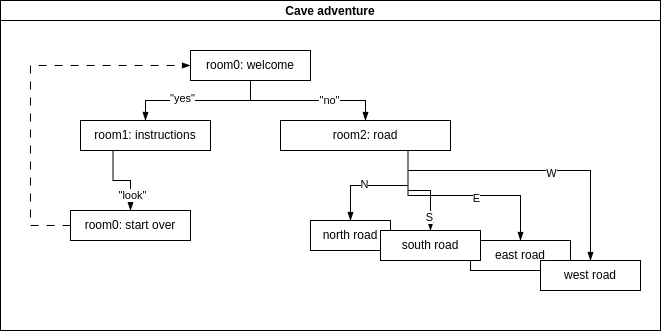
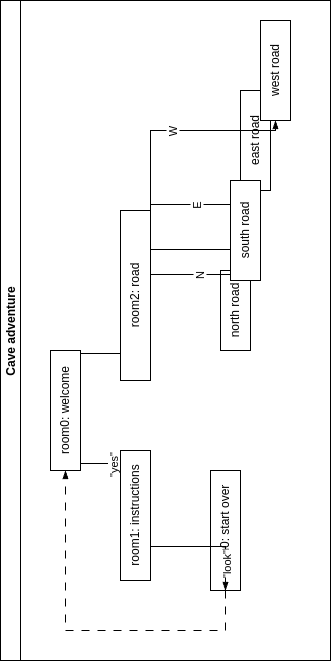
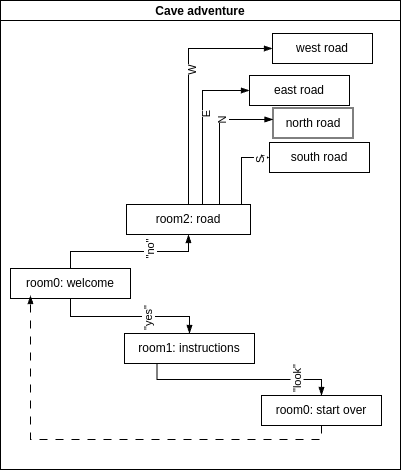
You can rearrange the rooms and branches in a tree diagram to look a bit more like the Python program.
Can you start to see how you might turn this design into code?
Perhaps it is more clear with the first if statement is at the upper left and the if and elif statements are below and to the right of the first room:
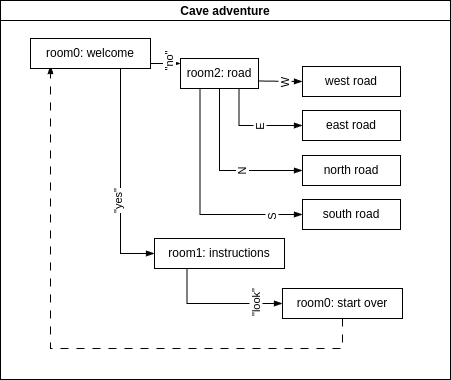
A hard-coded decision tree is probably a good place to start for a program like an adventure game.
See how the rooms kind-of line up with the nested if/else branches in a Python program?
print("Welcome to Mini Cave Adventure."):
command = input("Ready (yes|no)? ")
command = command.lower().strip()[0]

if command == 'y':
    print('You are outside a cabin and can go north, south, east or west? ')
    command = input('Which direction do you go (N, S, E, W)? ')
    command = command.lower().strip()[0]
    if command == 'n':
        print('You are on the north road. You win!')
    if command == 's':
        print('On the south road you fall into a pit. You lose!')
    if command == 'e':
        print('On the east road you meet a baddie. You lose!')
    if command == 'w':
        print('On the west road you walk on forever and run out of water. You lose!')
elif command.lower()[1] == 'n':
    print('You are playing a text adventure. Type answers to questions and try to win!')
    # What code goes here to start over?
    # Hint: would it help if you put all of this code inside a function?
It’s not a very fun game. You either lose or win after only 2 moves. And if you need instructions, you can’t start over! If you want your program to loop back to the beginning room you might have tried to use a ‘GOTO’ command, but there is no such thing in Python. Instead you need to define a main function for your program. That way you can call that function whenever you want to start or restart the game, even if you are already running the function.
It is perfectly fine, but a little confusing, for a function to call itself from inside the function. That may seem complicated, and it might lead to your program running forever, but it works OK for this simple example.
A function that sometimes calls itself is called a recursive function. It allows a program to try over and over again until some condition(if statement) evaluates to True.
def play_game():
    print("Welcome to a Mini Cave Adventure.")
    command = input("Ready (yes|no)? ")
    command = command.lower().strip()[0]

    if command == 'y':
        print('You are outside a cabin and can go north, south, east or west? ')
        command = input('Which direction do you go (N, S, E, W)? ')
        command = command.lower().strip()[0]
        if command == 'n':
            print('You are on the north road. You win!')
        if command == 's':
            print('On the south road you fall into a pit. You lose!')
        if command == 'e':
            print('On the east road you meet a baddie. You lose!')
        if command == 'w':
            print('On the west road you walk on forever and run out of water. You lose!')
    elif command == 'n':
        print('You are playing a text adventure. Type answers to questions and try to win!')
        return play_game()

    return command == 'n'


if (play_game()):
    print("Congratulations!")
else:
    print("Sorry.")
A function should always return something useful.
You can return True or 1 for success and 0 or False for failure or error
The only command that wins this particular game is an ‘n’.
So this play_game() function returns True when the last command the user typed was ‘n’.
That way True means that the user won the game.
Functions should also take an input that contains something useful.
You might want this function to take the user’s name, which you can retrieve from the operaring system using the os or sys packages built into Python.
def play_game(player_name="Player One"):
    print("Hi " + player_name + "! Welcome to a Mini Cave Adventure.")
    ...


import os
player_name = os.getlogin()


if play_game(player_name=player_name):
    print("Congratulations " + player_name + "!!!")
else:
    print("Sorry " + player_name + ".")
Or you could have a file that the game uses to store information like the user name and other information about the game and the user, like how many times the game has been played.
This play_game function could take a score argument that defaults to 0, and inside the function you could add 1 each time the user wins a game.
And after you complete Module 8, you might even know how to save the user’s score to disk and then load it at the beginning of the game, to keep track of how many times they’ve won.